I'm posting this in case other people experience problems with using python's colorsys and can't figure out how to get values they expect.
In my tree simulation software, the graphical options allow for 2d and 3d graphical formats. When I wrote the code, I had been tinkering with CFDG a lot, so I tied into it and used it to generate the graphics. At some point I need to revisit that and use something else to generate the graphics, but here's an example of what the 2d stuff looks like.
In this case the top panel is a top down view of the simulated forest, and the bottom panel is a side view to give you an idea of what the heights look like. The relative darkness of the green colour of each canopy represents how shaded that particular canopy is. Bright green means that canopy is receiving full sunlight, and a completely black canopy would be receiving no light at all. The latter never happens since the trees die before that point.
An example 3d view looks like this.
The spherical "warts" are visually oversized propagules. This particular scene is set in Ithaca, NY at around 06:30 and the summer solstice.
CFDG uses HSV for defining colours, but the 3d output is as a dxf autocad file, meaning the colour code is use an autocad colour index (ACI). Right now the colours of propagules, canopies, and trunks are hard coded in the code that generates the dxf file, but I was working on the code so I could generate prolate spheroids for canopies, and thought I could change that so the dxf would use the come colour as the species was defined to have.
The plan was to convert HSV into RGB, and then do some colour distance maths to pick the closest ACI value. Python has a colorsys module that lets one convert RGB to/from HSV, but as I used it, it did not behave in ways I expected.
I define canopies as having a HSV colour of 117°, 100%, 100%. An online colour picker I looked at said the RGB would be 13, 255,0. Here is where the wat with colorsys began.
The colorsys module wants values input values to be between 0 and 1, and will give you corresponding values. Since "H" is HSV is in degrees, you need to take the H value and divide it by 360. Your % values get divided by 100, so you end up using 0.325, 1.0, 1.0 like:
coloursys.hsv_to_rgb(0.325,1.0,1.0)
which gives you 0.04999, 1.0, 0.0. Now you need to multiple each value of that tuple by 255 to get 12.79, 255, 0...which is close enough to 13, 255, 0.
Now I need to make a RGB to ACI lookup table that measures colour distance and picks a ACI close to the RGB given.
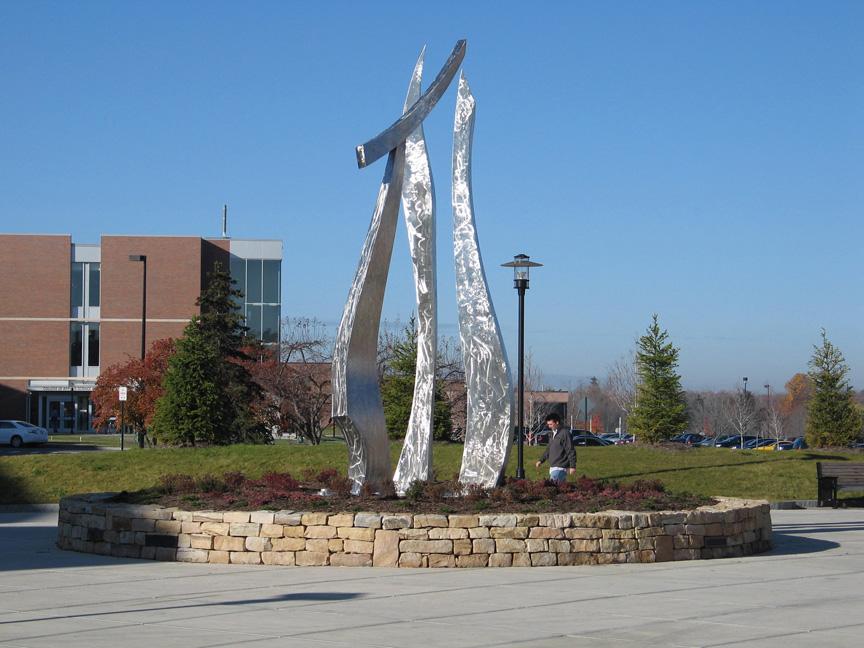
I'll start with the punchline: HOLY SHIT THE "UNITY" SCULPTURE LOOKS LIKE THE GDT LOGO!
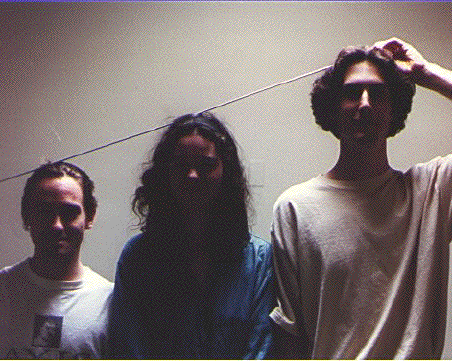
Way back in 1994, two close friends of mine discovered that, when we stood side-by-side, we made an interesting symbol:
Later on, we would use this symbol as the logo for a weekly publication called Gracies Dinnertime Theatre(GDT).[1][2] Over the years, one thing we tried to do within the publication was intentionally change the layout and presentation of material, including aspects of the logo. For the founders, the logo meant both "co-operation" and "change", the idea being that the simplest stable object is a tripod, but the lack of a level surface at the top of the symbol meant a lack of permanence. From 1994 until it stopped publishing in 2005, the GDT logo and how it was used had various incarnations, but always involved the three upright columns and an angled top piece.
April 1995 to November 1995
December 1995 to January 1996
February 1996 to March 1996,
September 1999 to December 1999
December 1996 to May 1997
April 1996 to November 1996,
September 1997 to May 1999
December 1999 to March 2000
March 2000 to May 2005
Despite having children and a respectable job, I look back on my time with GDT (1994 to 1998 as founder and editor, and as contributor into the 2000s) with fondness. For an upstart publication, we ended up doing things that still surprise and please me--like making up our own calendar that started on 16 July 1945 (the date of the first nuclear detonation). It seemed silly at the time but has gained support from fellow scientists.[3]
So when I first saw the "Unity" sculpture on the Rochester Institute of Technology campus, I was very surprised. The relationship between GDT and the administration of RIT was always poor: GDT was never officially a sanctioned publication and would often publish unflattering material about the college president, board members, and the school in general, GDT was an embarrassment.
On the ground, however, GDT received a great deal of support from professors, particularly those in the College of Imaging Arts and Sciences (CIA's). GDT's first "advisor" when it applied for and received a Creative Arts grant was Bruce Sodervick, a sculpture professor, and one of GDT's founding members was in the ceramics department. GDT would also regularly have Pizza and Coffee sales in the CIAS building to promote the publication and get a chance to talk with readers. To say that GDT had close ties to CIAS would be a bit of an understatement.
It should go without saying that the GDT logo was closely associated with the publication. We made shirts, stickers, even books that had the logo.
What am I to think when a GIANT GDT LOGO sculpture is erected on the RIT campus that is created by two professors in the sculpture department? I think it's pretty great! Thanks, guys!
I've been thinking a lot about personality recently. I'm not exactly sure what got me thinking about it, but it's been going on for a few months now. Since October, I think.
Regardless, part of my meditations have revolved around whether there is some truth behind Briggs-Meyers (BM) (or any other) categorization. Put another way, to paraphrase a much more rigorously minded friend: are personality categorizations convincing because they are vague enough that someone can read a description and say "ZOMG that is totally me"?
I'm not going to answer that. I _will_ say that it was sort of creepy how dead on the description of me at 16 Personalities was. I even had my wife read things as at an attempt at an objective outside observer, and she laughed while reading it saying again and again, "This is totally you."
So I can't answer whether there is just the magic of vague categories going on, but that's ok. What I was interested in was whether there are other ways to converge on a BM personality type.
One thing that occurred to me was to use software like what is at I Write Like (the github repository is at https://github.com/coding-robots/iwl). I threw a few writing samples at it--a long email, a previous blog entry, and some text from chatting online with a friend--to see what it would spit out. I specifically left out a sample of my scientific writing because that does not feel spontaneous or authentically me. The results looked like this:
Blog entry: I write like H. P. Lovecraft
Email: I write like David Foster Wallace
Online chat: I write like Stephen King
From there I did a quick search to see what people online thought these author's BM types might be:
H. P. Lovecraft: INFP
David Foster Wallace: INTP or INFP
Stephen King: INTP
And here is the interesting bit for me: when I take the BM tests, I score as a IN(T/F)P. It is T/F because the T and the F have exactly the same score. It's neat to see that the writing assessment and the (admittedly) non-rigorous BM assignment of the resulting writers matched my BM results so well.
The implication is that, depending on the medium I choose to communicate in, I could seem to be different. Email? INTP or INFP. Online chats? INTP. On a blog where I just spill my ideas? INFP.
Neat. Suggestive. Not at all something I am ready to say is Meaningful.
I'm working on a project that makes use of Day's Biographical Dictionary of the the History of Technology as a source. What I wanted to do required the book's information to be a database format, though. How do you go from "dark data" to something a computer can use? First, hope there is an ebook.
In this case, there is. I was able to get a PDF of the text, but it was still a book mean to be read and understood by humans. After thinking about it, I realized the format of the book was quite excellent and would allow for automated processing.
Each entry began with the name of an inventor, and ended with the initials of the editor (or editors) that worked on that section. In between those START and STOP markers were well defined details on things like birth (day, month, year, location), death (day, month, year), etc. There was also a page at the beginning of the book that listed all the editors and their abbreviations used at the end of each entry. Enter python, but practically any language could have parsed this. Without going into a lot of detail:
Read the pdf's editor index and stored it as a list and saved it to a file.
Read in the book's index of names and stored the names as a list and saved it as a file.
Read in the body of the pdf and stored it as text.
Using the editor list and the name list, I split the main body of the text into a giant list where each entry began with the name of someone in the index and ended with the initials of one of the editors.
Of course it wasn't that easy. For example, I discovered numerous instances where a name was spelled on way in the text, and another way in the index. After numerous rounds of cleanup to account for differences in names or oddities in formatting, I ended up with data I could write to a CSV for other processing.
Tonight, out of curiosity, I sat down and looked at the distribution of birth years for all inventors in my database born in or after 1690.
I am sure there are errors in the database since I have not throughly gone over it and checked entries, but this first pass showed N=1065 individuals, with a mean birth year of 1830 (median of 1834). I was somewhat surprised at how the numbers fell off as you get into the 20th century, but I have a thought as to why that might be. The book is a biographical take on the history of technology. For that reason, it is necessarily biased toward individuals, not for the work of teams of people. For example, who invented the atomic bomb? Yes, Leo Szilard famously came up with the idea and patented it, but he certainly didn't build one in his back shed. A team built The Gadget.
Don't misunderstand me to be on the "the age of the lone inventor is dead" wagon. I'm not weighing in on that. I'm simply trying to explain what I'm seeing and guessing at the bias in this one source.
UPDATED: 15 March, 2015. Maybe I should start another page....
Have you read the blog entries at Some Kind of Wonderful Noise? It chronicles how an adult (an ADULT!), born and raised in the U.S.A. Canada (EDIT: Canada is still not an excuse) somehow slipped through the cracks and never saw movies like Star Wars, Alien, Indiana Jones, etc. He live blogs his reactions and thoughts while watching these cultural touchstones. I highly recommend starting from his very first entries and reading them in order, because you can watch his working cultural vocabulary build, and he begins to make comments you'd expect from seasoned MSTies. It's like watching an AI bootstrap it's cultural subroutine.
The reason I mention Some Kind of Wonderful Noise is because my wife and I have been intentionally showing our sons various (mainly scifi) movies to introduce them to ones that we deem important to having a working cultural vocabulary. What does it mean when someone says "light is green? Trap is clean." Well, now my sons can use it in a sentence to explain the state of something. Shaka. When the walls fell.
Numerous people have asked for a list of the movies we've shown, so here it is. I'll update this list as more movies get shown. Please note that not everything on the list is what we would consider important. Some are just fun.
-----Time Travel Theme-----
Back to the Future 1,2,3
The Time Machine (1960)
Bill and Ted's Excellent Adventure
Time Bandits
Groundhog Day
The Time Machine (2002)
Flight of the Navigator
Planet of the Apes
Run Lola Run
My science project
The girl who leapt through time (2006 cartoon)
Stargate
Close Encounters of the 3rd Kind
The Explorers
Teen Wolf
Forbidden planet
Big Trouble in Little China
The Blob (short: Yip Yip's discover a telephone)
Men in black (short: Kermit the Frog. News Flash on Pinocchio)
The Goonies
Superman (1978)
Superman 2
Iron Giant
The Frighteners
Rewatch Star Wars (ep 4,5,6 and then 1,2,3)
Beatlejuice
Escape to Witch Mountain
Return to Witch Mountain
Cat from Outer Space
The Absentminded Professor
Who Framed Roger Rabbit
Gremlins
-----Stop motion theme-----
Jason and the Argonauts
The 7th Voyage of Sinbad
Golden Voyage of Sinbad
Mighty Joe Young (1949)
Clash of the Titans
The Beast from 20,000 Fathoms
E.T.
Wargames
Labyrinth
Short Circuit
Teenage Mutant Ninja Turtles (1990)
5th Element
Batman (1989)
War of the Worlds (1953)
War of the Worlds (2005)
Independence Day
Spiderman (2002)
Spiderman 2 (2004)
Peter Pan (2003)
Spiderman 3 (2007)
Hook
Weird Science
Frankenstein (1931)
Creature from the Black Lagoon (1954)
The Wolf Man (1941)
Mothra reboot (1996)
Mothra (1961)
Popeye
Land Before Time
Weird Science
-Short: Minuscule v1e1 "Le coccinelle"
The Adventures of Baron Munchausen
-Short: Minuscule v1e2 "Catapulte"
-----Avenger's Theme-----
Iron Man
Iron Man 2
-Short: Minuscule v1e3 "Bouse de lá!"
Thor (2011)
-Short: Minuscule v1e4 "Deux chenilles"
Captain America: The First Avenger (2011)
The Avengers (2012)
Iron Man 3 (2013)
Thor 2: The Dark World (2013)
Captain America 2: Winter Soldier (2014)
Guardians of the Galaxy (2014)
The Mask (1994)
The Last Unicorn (2012)
Justice League: War (2014)
Justice League: Throne of Atlantis (2015)
-----Star Wars Theme-----
Star Wars, A New Hope
Star Wars, Empire Strikes Back
Star Wars, Return of the Jedi
Star Wars, Attack of the Clones
Star Wars, The Clone Wars (2003)
Star Wars, Revenge of the Sith
Escape from Alcatraz (1979)
Wall-E (2008)
The Rocketeer (1991)
This isn't related to the Minecraft city generation project some of you have been following, but I thought this would be a good place to talk about something I've been working on for a while. If you own an apple device, you might have played with some of the text to speech(TTS) they include. Apple computers have had TTS for, literally, decades, but the most recent versions of voices are pretty good. The absolute best voice, quality wise, is one called Alex, introduced in OS X 10.5. [1]From a practical point of view, geology and soil science are more complicated than astrophysics.
The reason I say Alex is the best is because the voice simulates taking a breath. It seems trivial, but that is a great auditory cue to listeners about how the speaker is organizing what they are going to say. If you are face to face with someone, there are even subtle facial cues during that breath that clues the listener in on what is going to be said next.
So, Alex breathes. But he, and the other voices are not exactly warm feeling. I've been putting together some weekly hour long 'story hours' and am modeling the narration roughly off of Zero Hour and the "Tokeo Rose" esthetic. Here's a clip
The voice I am using is "Moria," which was added to the possible voice choices with OS X 10.7. In the clip above, I'm adding effects to distort the voice and try and make it sound like it's coming over sketchy, old equipment, but it's still clearly an inhuman voice. A friend commented on how annoying he found it, so I started thinking about ways around that.
The easy solution would be for me to just do the voice, but I hear my voice enough. If computer voices were not good enough, maybe there was an intermediate. TTS voices prior to those introduced in OS X 10.7 allow one to change the pitch, duration, volume and other attributes for each phoneme (or at least the OS X version of phonemes).
Now, for some reason, when I think of testing audio, I think of a scene from the movie "Ten Things I Hate About You" in which Heath Ledger sings "You're just to good to be true" by Frankie Valli. Seriously, I test mics at the start of conference calls by singing a few lines.
Like me, the Alex voice is not much of a singer. We both mean well, but sort of suck. Take a listen:
In theory, it's possible to get Alex to sing, but to do so by hand would not be fun, and I was looking for an automated way to get the TTS voices to sound a bit more human. Burried in the OS X Developer tools is an application called Repeat After Me (RAM).
The way it is supposed to work is, you enter the text string you want the computer to say in the "Text" box. Click on "To Phonemes" to convert the string to OS X phonemes (Anything more than 100 phonemes will make later steps fail). Then, clicking on "Build Graph" generates a frequency graph of what that voice's speech rules indicate are reasonable guesses about how the phrase will be spoken.
RAM is not the most transparent application, and the documentation is not great, but each of the little dots in the "Tune" window are draggable. You can also add more drag points by holding Shift while clicking on the pitch line. Option+dragging a point will let you move that indvididual point. The real magic happens when you import a sound file. In this case, it's Heath Ledger singing.
I grabbed the audio of Health Ledger singing the song and pumped it through the Sound eXchange program (SoX). First, to increase the overall volume of the track, and second to automatically split the track into separate ones, based on pauses
That file was imported into RAM. Clicking the "Impose Durations, "Extract Pitch," and "Impose Pitch" buttons Makes RAM tray and make your typed text match the durraction of the audio file, and uses the pitch profile of the audio file as the basis for the pitch of the typed text. Lastly, you click on "Tune", and the end product is a series of text that the pre OS X 10.7 voices can use as the basis of how to speak.
According to RAM, to get the voice Alex to sing the phrase "You're just too good to be true" like Heath Ledger, you need the following:
[[inpt TUNE]]
~
y {D 50; P 265.0:0 162.0:41}
2AO {D 170; P 183.0:0 200.0:44}
r {D 20; P 239.0:0 245.0:55}
_
J {D 110; P 245.0:0 220.0:6 220.0:33 220.0:67}
1UX {D 120; P 227.0:0 234.0:35 237.0:85}
s {D 120; P 218.0:0 218.0:29}
t {D 20; P 218.0:0 218.0:13 218.0:63}
_
t {D 70; P 218.0:0 218.0:6 218.0:19 218.0:25 218.0:38 218.0:69}
1UW {D 220; P 232.0:0 229.0:4 227.0:37 227.0:44 229.0:74 229.0:81}
_
g {D 100; P 225.0:0 225.0:8 225.0:42}
1UH {D 150; P 237.0:0 237.0:4 237.0:11 242.0:19 245.0:26 259.0:70 259.0:85}
d {D 140; P 259.0:0 259.0:20 259.0:40}
~
t {D 120; P 259.0:0 259.0:67}
AX {D 160; P 227.0:0 227.0:5 229.0:30 227.0:75}
_
b {D 60; P 199.0:0 199.0:8 199.0:38 190.0:69}
1IY {D 170; P 195.0:0 195.0:7 198.0:37 198.0:44 200.0:52 300.0:56 400.0:85}
_
t {D 210; P 399.0:0 398.0:5 396.0:21 394.0:53}
r {D 30; P 222.0:0 222.0:5 222.0:20 222.0:35 222.0:45 222.0:75}
1UW {D 550; P 222.0:0 222.0:2 222.0:29 234.0:100}
. {D 460}
[[inpt TEXT]]
Which sounds like:
This is far from a quick process, and there's no similar command line tools that I am aware of. Enter AppleScript, System Events, GUI Scripting, and Python.
RAM is on a scriptable application in that it is not made to allow AppleScript to easily control it. You can control applications using System Events and GUI scripting though. The downside of doing it this way is that the computer is following a script of actions in a very braindead way, and it's impossible to use the computer for anything else, since the script is mimicking user input going to the application. So, it is doable, but feels like a Rube Goldberg machine.
I wrote a Python backend that takes arguments on the name of a file with dialog to be spoken (in this case, one line of text for each audio file made by SoX), an output file name, and the computer voice to use. The Python script does most of the housekeeping and then passes info to a seperate applescript that automates all of the steps I outlined above (plus saving the resulting RAM file in case you want to edit it later). For each short audio file, the Python script get back the tunes phoneme text, and joins them together making a single string of text representing the song. It sends the string to the system and saves the resulting audio to a file, effectively providing an automated workflow for taking recorded audio and a transcript and producing a computer generated audio recording that captures some of the human reader's nuances.
Now, RAM doesn't always do a good job in getting the durations or imposing pitch. Take for example this:
It's clear that RAM failed to get the durations correct, and the tuning of the frequencies could be better at the start. A quick manual change results in:
When you just let the scripts run without any interference, a wholly automatically generated file sounds like:
But if you reopen the saved RAM files and manually adust the durations a bit, you get something closer to the original. Below are a few samples of the whole process sung by the Victoria (introduced in OS X 10.0), Vicki (introduced in OS X 10.4), and Alex (introduced in OS X 10.6). It is worth noting that even older voices sound passable. Minor hand tweeking of durations and pitch results in a robotic Heath Ledger, presented with his original version for comparision.
Victoria (OS X 10.0):
Been a while since I posted anything, so I thought I would say everything is still going.
Minecraft has gone through a number of updates, and as a consequence I decided to roll a new world. As this is version 2 of the idea, I realized the number of cities I had created was far too many. 30+ abandoned cities might be great on a server with a hundred or more players, but the server I admin has under 20 players, and there are rarely more than five people on at a time. For that reason, I have lowered the total number of cities to 19.
Along the way, I have revised and extended my various scripts. Right now I have two basic ones:
cityPlacer.py and mapExplorer.py
The cityPlacer is pretty straight forward: it uses method I described previously to teleport an admin around the world, leave them in a spot to allow cities to generate around them, and then moves them to their next spot.
The mapExplorer script is pretty cool, though. It, too, teleports the player around, but it does so only to expose a map the player holds.
In this way I can have maps for each city without having to manually fly around.
An interesting consequence of this is if the rate of teleporting is high enough, the maps will not fully render. This creates a really delightful ancient feel to the maps.
Being able to automate the exploration of the city centers is pretty sweet.
In upcoming posts, I'll share the new look of the teleportation gates.